Cataract Surgery Foundation Model
This project was done partly during my internship as a machine learning developer at the Quebec Artificial Intelligence Institute (MILA).
For this project, I developed a domain-specific video foundation model for cataract surgery called CataractFM. Instead of training a model for one specific output, I wanted to build a reusable visual encoder that could learn the instruments, anatomy, appearance and timing patterns found in cataract surgery videos. That encoder could then be adapted for different tasks like surgical phase recognition, instrument analysis, pupil monitoring and potentially even detecting unusual events during surgery. A normal image model looks at one frame at a time, which means it can recognize what is currently visible but might miss how the scene is changing. This is important for cataract surgery because different phases can look really similar in a single frame. The key difference might be how an instrument is moving, what happened a few seconds earlier, or what happens next. Because of this, I based CataractFM on VideoMAE Base, which is a video transformer that learns from both the spatial and temporal information in a clip.
I developed the model in two main stages. First, I made CataractFM v1 which adapted a pretrained VideoMAE model to cataract surgery using masked-video reconstruction, which is where most of each surgical clip was hidden and the model has to predict the missing content which helps it learn. I then built CataractFM v2 on top of the v1 encoder using temporal JEPA training, which is where the model uses an earlier surgical clip to predict what will happen in a few seconds. JEPA is not trying to predict the future pixels on the screen, but instead trying to get a higher-level idea of how the surgery progresses over time. Finally, I used LoRA to adapt the foundation model to surgical phase classification. LoRA keeps most of the original model frozen and trains only a small set of additional parameters, which allows the model to specialize for phase recognition without retaining all of its 94 million parameters.

Data and Video Processing
I trained the foundation encoder using 1,000 videos from the Cataract-1K dataset. This dataset is a publicly released dataset containing 1,000 videos of real cataract surgeries performed at the eye clinic of Klinikum Klagenfurt in Austria between 2021 and 2023. The videos were captured using a ZEISS surgical microscope which is the same view a surgeon would see during the procedure. The full dataset and its annotations were made publicly available for research.

Since I was using all 1000 videos for my foundation model, I split them into 900 training surgeries and 100 validation surgeries. The split was done at the surgery level, not the clip level, so footage from the same operation could never appear in both sets. This was important because nearby clips from one surgery can look almost identical. Before training, I converted the original videos into smaller proxy videos. A proxy is basically a smaller copy of the original video that is faster to process, and I decided to use this because the original videos were really large and decoding them during training would take a really long time. I converted each video to 8 frames per second with a height of 256 pixels. I stored these proxy videos in a persistent cache, which just means I saved them in Drive so I wouldn’t have to worry about recreating them every time I restarted the Colab notebook I was working on.
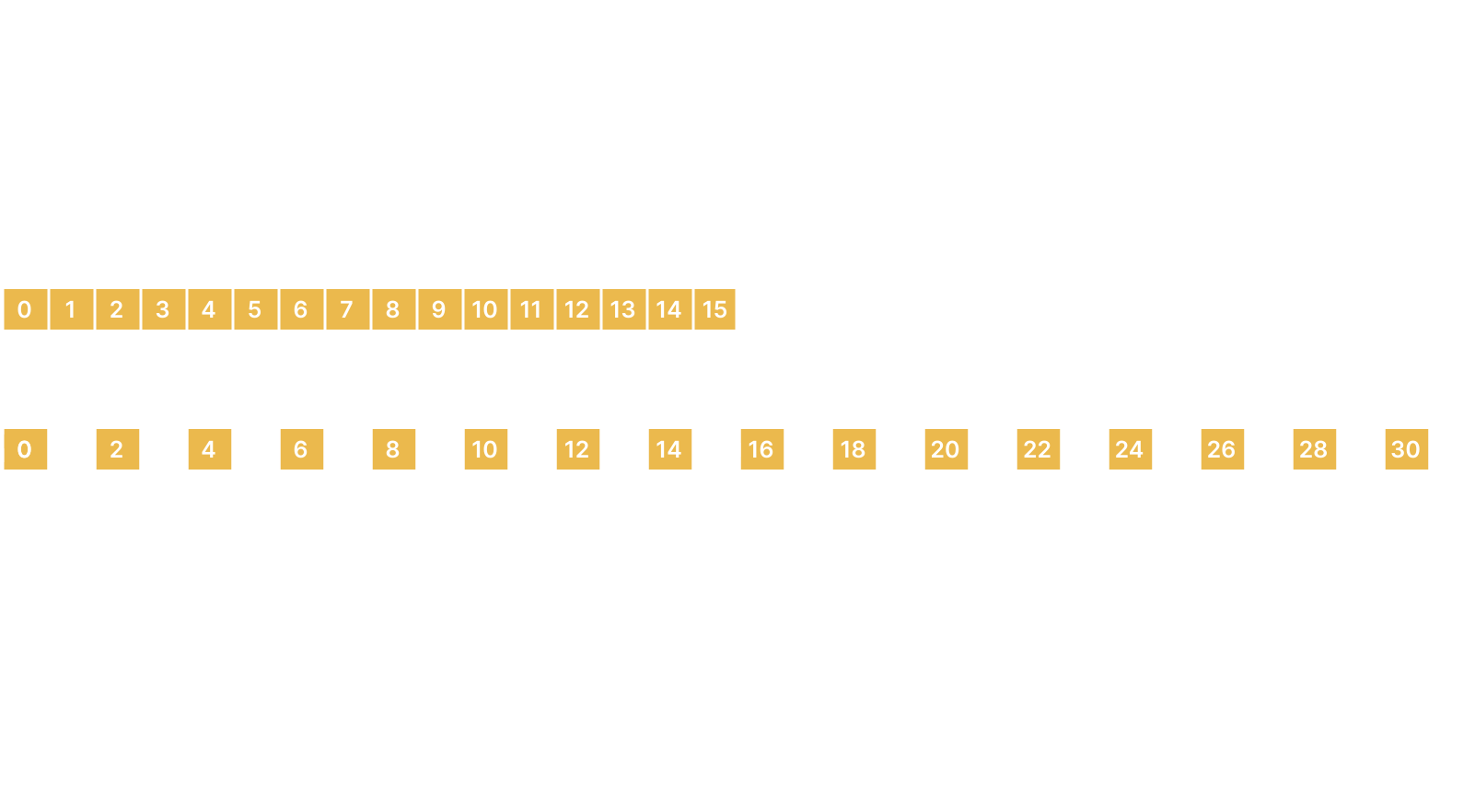
The model does not process an entire surgery all at once. It instead sampled short clips containing 16 frames each. Each frame was resized to 224 x 224 pixels. I used two different temporal strides, which controls how far apart the chosen frames are. With stride 1, the model looks at every frame one after the other, so the 16-frame clip is around 1.9 seconds. With stride 2, it takes every other frame, so the 16-frame clip covers 3.8 seconds. This lets the model see both faster instrument movements and slower changes. Before the clip was given to the model, I first resized it so its shorter side was 256 pixels, then cropped it to 224 x 224. The crop covered at least 85% of the original frame and was slightly shifted from the centre to add some visual variety without cutting out the main surgery area. I also added small colour changes during training so the model would not become too dependent on one specific lighting condition. I decided not to flip the videos since the direction and orientation of the instruments could contain useful information for the model to learn.
I used the VideoMAE Base as the main encoder because it's designed specifically for videos. In cataract surgery, different phases can sometimes look pretty similar when you just look at a still frame, so the important information might come from how the instrument is moving or what happened a few seconds earlier. VideoMAE is good for learning this kind of data, since it can process both how a frame looks and how it changes over time. It is a pretrained model that has already learned general motion patterns from other videos. The VideoMAE Base model contains 94 million parameters with 12 transformer blocks, and each video token is represented internally by a vector of 768 learned features.
Before VideoMAE can process a video, it needs to break the clip down into small pieces called tokens. In this model, each token comes from a small 3D block called a tubelet. To create the tubelets, VideoMAE takes each 224 x 224 frame and divides it into small 16 x 16 pixel patches (thus there will be 196 of these pixel patches for each frame). Then it groups the same patch location across two consecutive frames to form one tubelet. Since each input clip contains 16 frames and each tubelet spans 2 frames, there are 16/2=8 positions through time. This gives a total of 8 x 196 = 1568 tubelets per clip. VideoMAE converts each tubelet into a token, so every 16-frame clip that enters the transformer will have 1568 space-time tokens.

CataractFM v1
Ok this model didn’t start out being named CataractFM v1, I originally named it CataractFM because I thought my method would work and this would be the final model. You’ll see what happens, but I realized at the end there needed to be a v2 so now this is CataractFM v1. Enjoy.
Architecture
This model contained three main components:
- A trainable VideoMAE student encoder
- A frozen VideoMAE teacher encoder
- The pretrained VideoMAE reconstruction decoder
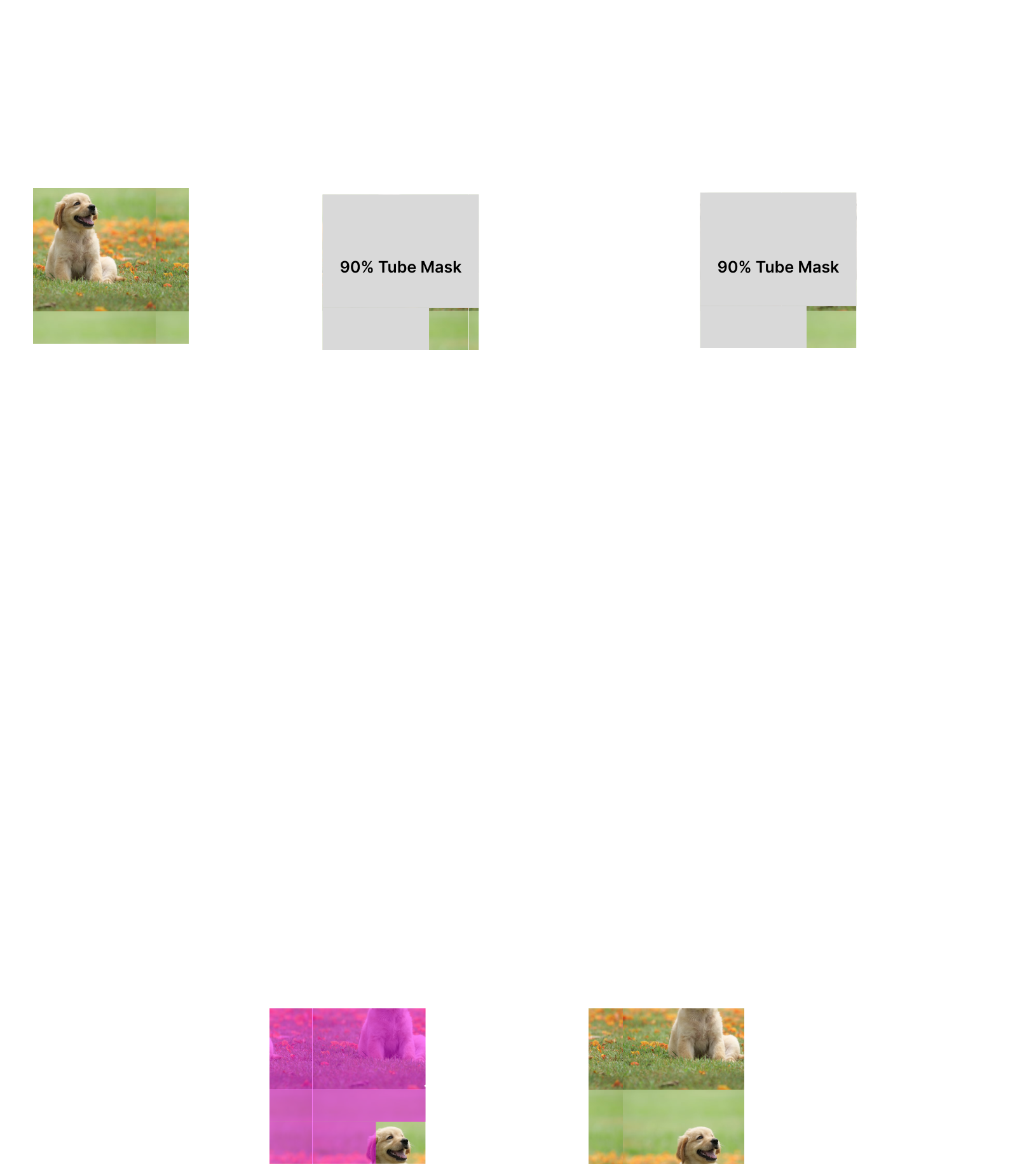
Here’s how it works: the student and the teacher are both copies of the pretrained VideoMAE model. They are both given the exact same tubelets where 90% of the video clip is covered using a tube mask. This means both student and teacher saw the same 10% of each video piece they’re given. The teacher is then frozen, which means its parameters are not able to change. The student starts to learn and adapt its parameters to recognize useful features in cataract surgery, while the teacher remains as a baseline. During training, the student is penalized if its features become too different from the teacher’s. This helps stop the student from specializing too much on cataract surgery and forgetting useful features it learned during pretraining like general shapes and textures, which are useful to keep since I’m trying to make a foundation model. The job of the decoder is basically to check how well the student is learning. When the student gets the visible 10% of the video, it will encode it into features that it sends to the decoder, who will then use these features to try and reconstruct the remaining 90% of the video. The reconstructed video that the decoder produces will be compared with the actual video and if they are similar, this means the student is generating useful features and if they are different, then the student’s parameters will be updated so that it can produce better features for the decoder next time. I hope that explanation made sense.
Loss Functions
To control how the student learned from the decoder while still staying close to the teacher, I trained the CataractFM v1 model using a combination of three loss functions. Loss is a value that tells the model how wrong its output is, so lower loss = good. The complete loss was made up of L_reconstruction + L_visible + 0.25L_global. Let me explain each one:
The reconstruction loss (L_reconstruction) measures how accurately the decoder could reconstruct the hidden video patches. If its reconstructed video was very similar to the actual video, the loss would be smaller. This helps inform the student whether it needs to update its parameters or if it's on the right track.
The visible-feature loss (L_visible) compares how different the student’s features are from the original teacher’s features. Remember I said that both student and teacher models are given the exact same tubelets to look at, both with the same 90% of the section covered. Both the teacher and the trained student will generate features from what they see. The visible-feature loss function compares these features and if they are too different, then the loss will be larger which is what penalizes the student and tells it to move closer to the teacher’s representation. The actual code in my notebook looks like this:
visible_feature_loss = torch.nn.functional.smooth_l1_loss(
    normalized_student,
    normalized_teacher,
)
Where normalized_student and normalized_teacher are the features generated from each model, normalized so they’re on the same scale before comparison. The smooth_l1_loss function is used because it doesn’t let one or two large differences skew the loss value.
The global-retention loss (L_global) compares whether the student and teacher describe the overall video in a similar way, rather than just a single tubelet. The student produces a feature for each visible token in the clip, and these features are averaged together to create one overall representation, which we can call student_global. The teacher does the same thing to create teacher_global. We then compare these two overall representations to check whether the student’s understanding of the clip is still reasonably similar to the teacher’s. This is how it looks in my code:
global_retention_loss = 1.0 - torch.nn.functional.cosine_similarity(
    student_global,
    teacher_global,
    dim=-1,
).mean()
Ok so an analogy of this would be if we imagine student_global to be a vector arrow and teacher_global to be another vector arrow, then cosine similarity would check whether they’re pointing in the same direction. If they are in the exact same direction (perfect case) then the cos function would be 1 and 1.0-1 = 0 so there would be no loss. Honestly, this global-retention loss is less important because I still wanted the student to learn new cataract specific features and not be forced to stay too close to the teacher, which is why it's only given a 0.25 weight in the combined overall loss value.
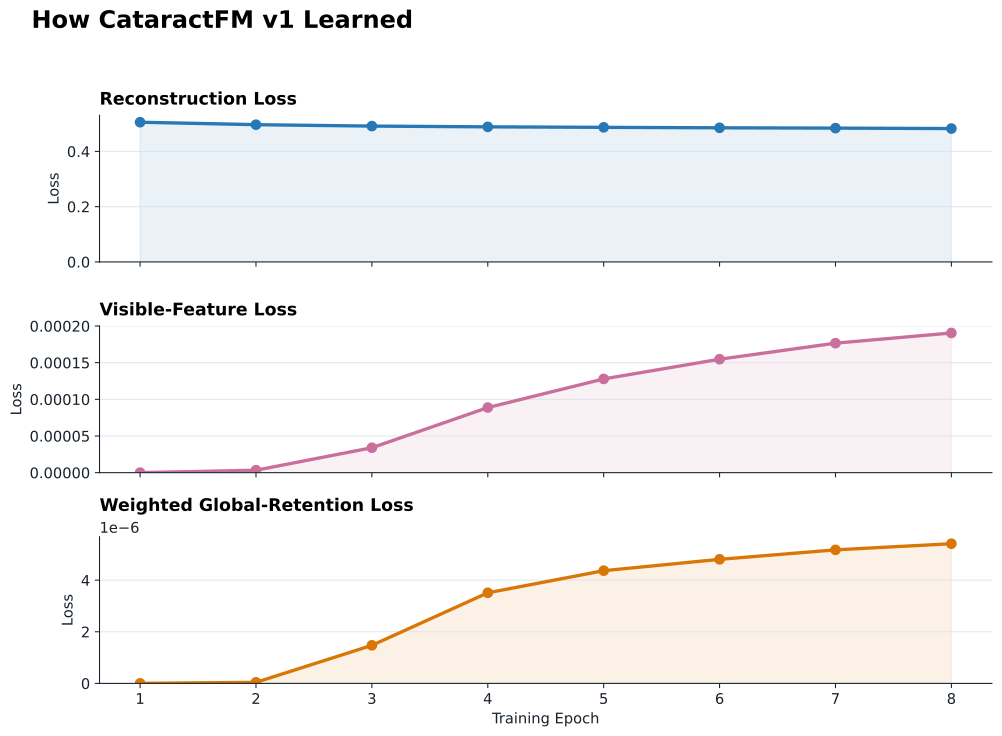
The graphs below show how each of the three loss components changed throughout CataractFM v1’s training. Because the three losses have different numerical scales, they are shown on separate graphs. Each point represents the average loss during that epoch. The global-retention curve is shown after applying its 0.25 weight, so it represents the amount that the loss actually contributed. Lower values mean that the model was performing better.
Conservative Fine-Tuning
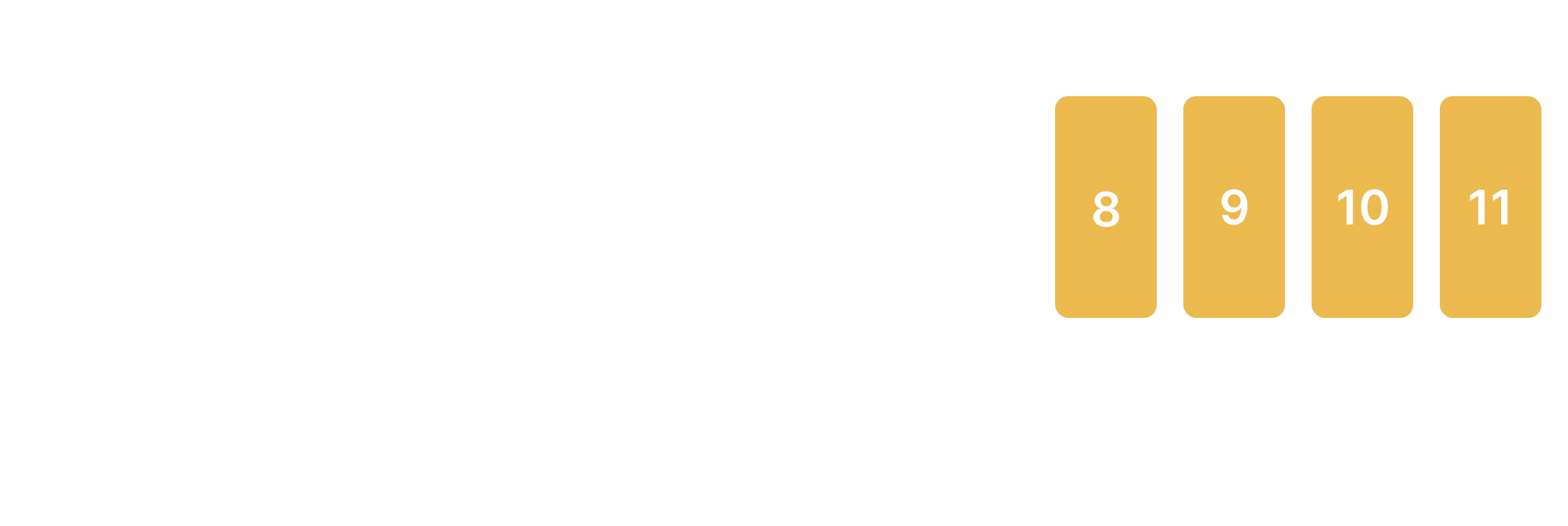
I fine-tuned CataractFM v1 conservatively, which basically means I wanted the model to learn cataract-specific information without changing the pretrained VideoMAE model more than necessary. I trained the model for 8 epochs. During the first epoch, I completely froze the student encoder, meaning none of its parameters were allowed to change, and only trained the reconstruction decoder. I did this so the decoder could first get used to reconstructing cataract surgery footage before it started sending training signals back through the student. The teacher stayed frozen during the entire process since its job was to remain as the unchanged pretrained baseline. For epochs 2–8, I allowed the student to start learning, but I still did not train the whole encoder. VideoMAE has 12 transformer blocks, numbered 0–11, and I only unfroze the upper four blocks: 8, 9, 10, and 11. The lower eight remained frozen. Earlier blocks of the pretrained model (like 0, 1, 2, etc) generally contain more basic, reusable visual information like general shapes and edges, while the later blocks combine these features into more complicated representations. Keeping the lower blocks frozen helped preserve more of VideoMAE’s general knowledge, while the upper blocks were allowed to adapt more specifically to cataract surgery.
I also made the updates to the student very small. The maximum encoder learning rate was 2 × 10⁻⁶, while the decoder used a larger learning rate of 5 × 10⁻⁵. A learning rate controls how much the model’s parameters are changed after each training update, so the much smaller encoder learning rate means that its pretrained parameters were only adjusted gradually. The decoder was allowed to change faster because its main purpose was specifically to learn how to reconstruct the cataract footage.
To actually update the trainable parameters, I used the AdamW optimizer. After the three losses are calculated, the model calculates gradients, which basically tell it how changing each trainable parameter would affect the loss. AdamW then uses those gradients to decide how the parameters should be adjusted so the overall loss gets smaller. I used an effective batch size of 32, which means we need information from 32 training clips before doing a full parameter update instead of updating the model based on only one clip at a time. This makes each update less dependent on one unusual training example. If all 32 clips could not fit into GPU memory at once, I used gradient accumulation. This means the GPU could process several smaller groups of clips, save the gradients from each group, and then only update the model once enough examples had accumulated to equal the batch size of 32. Also, since I was using the A100 GPU in Colab, I used BF16 precision which stores the numbers used during training with fewer bits than standard 32-bit precision, reducing GPU memory use and speeding up the calculations. Gradient accumulation and BF16 precision was mainly just to make training a model as big as CataractFM more efficient, it didn’t actually affect what the model was learning.
Model Selection and Transfer Evaluation
After training CataractFM v1, I still needed to decide which version of the adapted encoder I actually wanted to keep. I created four different versions of the encoder between the original pretrained VideoMAE and the fully adapted CataractFM v1 model. I represented the original pretrained VideoMAE parameters as theta_0 and the fully adapted CataractFM parameters as theta_adapted. The parameters of each test model were calculated using:
theta_candidate = theta_0 + alpha(theta_adapted - theta_0)
Where (theta_adapted - theta_0) represents all of the parameter changes that happened during CataractFM v1 training, and alpha controls how much of those changes I keep. For example, if alpha = 0.25, I start with the original VideoMAE parameters and add only 25% of the changes learned during CataractFM training. If alpha = 0.50, I keep half of the changes. Alpha = 0.75 keeps 75%, and alpha = 1.00 keeps the complete adapted model. The reason I did this was because I wanted to keep as much cataract-specific adaptation as possible, but only if the model's internal representations were still healthy. If the fully adapted model had changed too much, I could have chosen something like alpha = 0.75 instead and kept most of the cataract-specific learning while moving the model slightly back toward the original VideoMAE.
I passed the same unlabelled validation clips through each candidate model and compared the features they produced with the features from the original VideoMAE. I used three checks: mean cosine similarity, linear CKA, and effective-rank ratio. These three checks make up a retention gate that decides whether the model passes or fails (pass means it has a healthy enough internal representation to be selected as the foundation encoder).
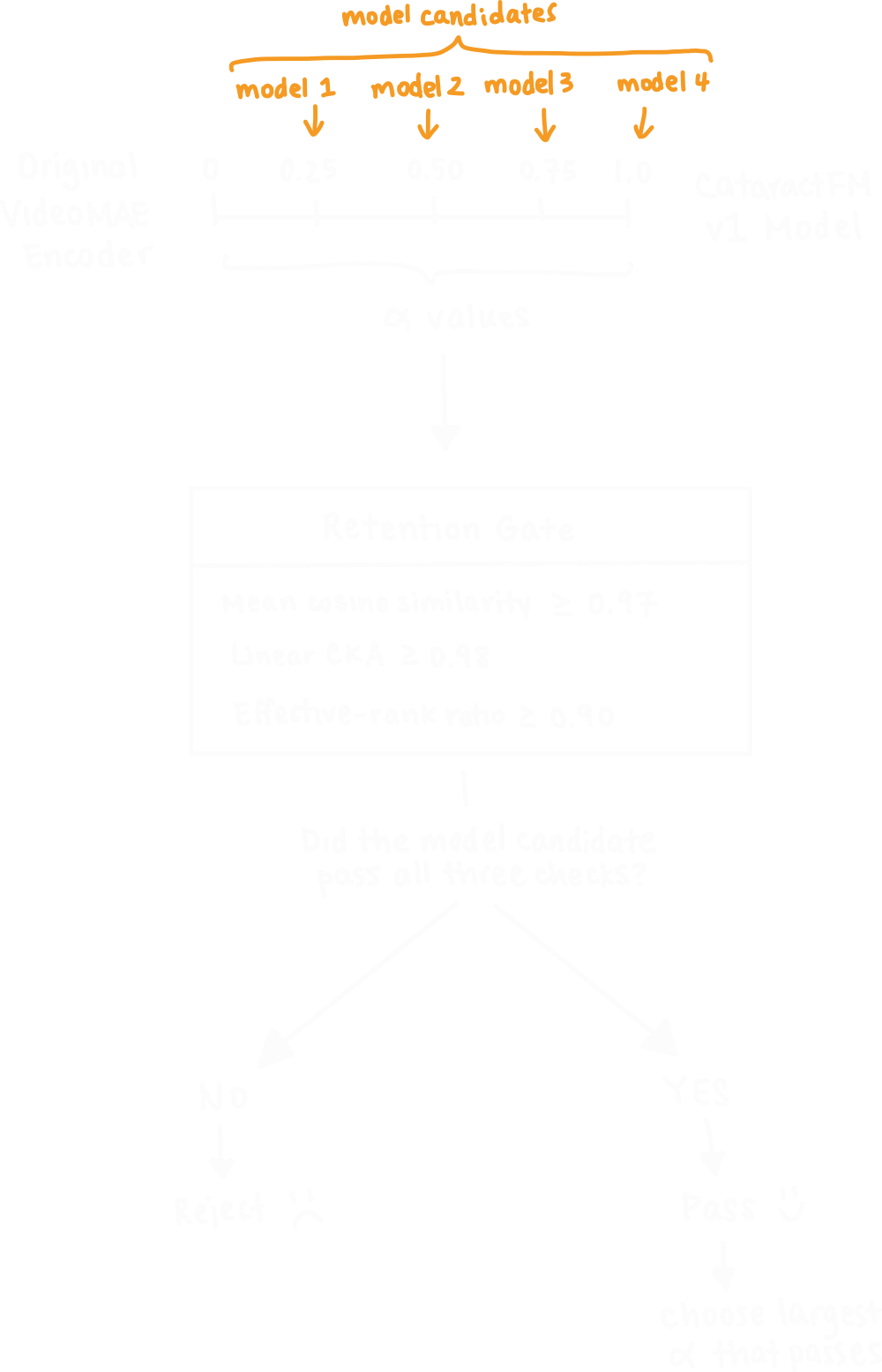
The first check was mean cosine similarity. This compares the feature vector produced by the candidate model for a clip with the feature vector produced by the original VideoMAE for that same clip. This is just like the cosine similarity used for finding the global-retention loss. If the feature vectors are arrows, then if the two arrows point in almost the same direction then their cosine similarity is close to 1. I made the requirement for the mean cosine similarity to be at least 0.97 which means that the two video representations needed to be pretty strongly aligned.
The second check was linear CKA, with a required value of at least 0.98. CKA looks at the representation on a larger scale. Instead of only asking whether the feature vector for one clip is similar, it checks whether the overall relationships between many clips are still organized in a similar way. For example, if VideoMAE represents clips A and B as very similar and clip C as more different, I want the adapted model to keep roughly that same structure even if the exact feature numbers change. I used this to make sure CataractFM had not completely rearranged the useful feature structure that VideoMAE had already learned.
The third check was the effective-rank ratio, which had to be at least 0.90. The encoder produces large feature vectors, and I want those features to contain a wide range of useful information. A model can sometimes collapse and start representing many different videos in almost the same way. Effective rank measures how much variation is still being used in the feature space. The ratio compares the candidate model with the original VideoMAE, so a value close to 1 means the candidate model kept almost all of the original feature-space diversity, which is good.
I chose the largest alpha that passed all three checks because that meant I was keeping the strongest cataract-specific adaptation that was still within my retention limits. Based on my data (below), all four models passed so alpha = 1.00 was chosen.
| Alpha | Mean cosine similarity | Linear CKA similarity | Effective-rank ratio | Result |
|---|---|---|---|---|
| 0.25 | 0.9999991059 | 0.999998033 | 0.9983683005 | PASS |
| 0.5 | 0.9999963641 | 0.9999923706 | 0.9968093943 | PASS |
| 0.75 | 0.9999920726 | 0.9999825358 | 0.9952605706 | PASS |
| 1 | 0.9999859333 | 0.9999685287 | 0.9937626024 | PASS |
Once I chose my encoder, I needed to test whether the features it learned would be useful for a surgical task. That was the whole point of having a foundation model. I froze the entire CataractFM v1 encoder (its parameters can’t change) and trained only a simple linear classifier on top of the features it produced. This is called a linear probe. The point is to test the quality of the features that are already inside the encoder. I evaluated this using the Cataract-1K Phase Recognition Set, which contained 56 surgeries and 10,278 labelled clips across 13 surgical states. I compared the selected CataractFM v1 encoder against the untouched pretrained VideoMAE using the same type of frozen linear-probe evaluation, and the results are in the table below:
| Model | Macro F1 | Balanced Accuracy |
|---|---|---|
| Original VideoMAE | 0.7073 | 0.7204 |
| CataractFM v1 | 0.7098 | 0.7226 |
Side note: Macro F1 measures the model’s classification performance equally across all 13 surgical phases, so rare phases count just as much as common phases which means a model cannot get a high macro F1 by just being really good at predicting the most common surgical phases in a video.
Ok as you can see, the improvement was pretty small. The important thing is that at least the cataract-specific training didn’t make the encoder worse! It made it very marginally better. I knew I had to make improvements to this model, and since CataractFM v1 passed the retention gate and still showed some useful results, I used this encoder as the base model for CataractFM v2.
CataractFM v2
Ok so after CataractFM v1 I had to really think about how to make this next model better and I realized my problem was that the v1 model was mostly learning what was happening inside individual short clips, but surgery depends a lot on how things change over time. I decided to add temporal JEPA training because that’s good for helping the model learn relationships between an earlier clip and what happens a few seconds later in the same surgery, and then add LoRA to adapt that stronger encoder to phase classification without retraining all 94 million parameters. Of course I didn’t just invent these methods, I found JEPA in these articles (Assran et al., 2023 and Bardes et al., 2024) and the original LoRA paper is here (Hu et al., 2022). The funny thing is LoRA was originally made for LLMs but it technically works with any transformer.
Temporal JEPA Training
Joint-Embedding Predictive Architecture (JEPA) is used to predict the feature representation of a future clip, rather than trying to predict the pixels of the future clip. A feature representation is basically the numerical description the encoder creates after looking at a video. This means the model will focus more on the meaning of the surgery rather than trying to predict every color and detail.
JEPA Architecture
The architecture I used for my CataractFM v2 for JEPA training was:
- A trainable student encoder
- An exponential-moving-average (EMA) teacher encoder
- A frozen CataractFM v1 encoder
- A small predictor network
As mentioned before, all three started from the CataractFM v1 model. This meant JEPA was not starting again from the original general VideoMAE model. Instead, it was building on an encoder that had already been adapted to cataract surgery. For every training example, I chose two clips from the same surgery. The first was called the context clip, and the second was called the future target clip. The future clip started between 1-8 seconds after the context clip. I also used opposite temporal strides for the context and future clips. Remember I mentioned before that temporal stride controls how far apart the chosen frames are. If the clip used stride 1 this means every frame was sampled, and stride 2 means every second frame was sampled. I set it up so that the context clip used stride 1 while the future clip used stride 2 and vice versa, and I did this so the model would not become dependent on one exact sampling speed. It would instead have to learn the underlying surgical meaning even when the same surgery was viewed over slightly different time scales.
Here’s how it works: The student only processes the context clip, and the teacher processes the actual future clip. The goal is for the student to predict what the teacher’s representation of that future clip will look like. The important thing is that the student never actually sees the future clip, so it has to learn from the context clip what kind of surgical state is most likely to happen next. Both student and teacher will first encode their clips into feature representations. The student creates a 768-number representation of the context clip which it passes into the small predictor network. The predictor’s job is basically to take the student’s understanding of what is happening now and predict what the feature representation should look like a few seconds later. The predictor first expands the 768 features to 2,048 features so it has more room to learn the relationship between the current and future clips. It then uses a GELU activation and normalization which helps it learn more complicated relationships before reducing the result back to 768 numbers. The final 768 values are the student’s predicted future representation. I can then compare this predicted future representation with the teacher’s representation of the actual future clip. If the two are similar, that means the student is doing a good job of using the current surgical state to predict what kind of state will appear next. If they are very different, the predictive loss becomes larger and the student and predictor are updated so they can make a better prediction next time.

The teacher here works differently from the frozen teacher I used in CataractFM v1. Instead of staying completely unchanged, this teacher is an exponential-moving-average (EMA) teacher which means it slowly follows the student as the student learns. After each optimizer update, I moved the teacher’s parameters a very small amount toward the student’s parameters:
@torch.no_grad()
def update_ema_teacher(teacher, student, momentum):
    for teacher_parameter, student_parameter in zip(
        teacher.parameters(),
        student.parameters(),
    ):
        teacher_parameter.mul_(momentum).add_(
            student_parameter,
            alpha=1.0 - momentum,
        )

momentum = 0.996 + (0.9999 - 0.996) * training_progress

update_ema_teacher(
    teacher,
    student,
    momentum,
)
The momentum value controls how slowly the teacher follows the student. At the beginning of training, the momentum was 0.996, meaning each update retained 99.6% of the teacher’s previous value and incorporated 0.4% of the student’s new value. The momentum gradually increased to 0.9999, so the teacher became even more stable near the end of training. Adding the torch.no_grad() means the teacher does not learn directly from the loss and instead it just slowly follows the student. The reason why I made the teacher an EMA teacher and not a frozen one is because I wanted the teacher’s feature representation of the future clip to improve slowly over time as the model trains. If I froze it then the student would just be trying to predict the old CataractFM v1 model’s representation of the future clip. The important part is that the teacher improves very very slowly, so the feature representation (which is the target the student is trying to meet) doesn’t shift too much so the student will have time to actually learn.
I also included a third encoder, which was a frozen copy of CataractFM v1. I used this as a baseline reference which acts kind of like the frozen teacher did in v1. The student was now being trained to learn temporal relationships, but I didn’t want it to get so focused on predicting the future that it forgot the useful cataract-specific features that it already learned in v1. The frozen v1 model processes the same context clip as the student, and I compare the student’s current representation with the original v1 representation. If the student moves too far away, it will get an additional penalty. So basically the EMA teacher helps the student learn what comes next, while the frozen v1 model helps it remember what it already learned about cataract surgery.
JEPA Loss
This is very similar to the first time I explained how I used loss for my model, except for JEPA I am now using three different types of loss added together: L_predictive + 0.50L_anchor + 0.05L_variance.
The predictive loss (L_predictive) measures how similar the student’s predicted future representation is to the representation that the EMA teacher produced from the actual future clip. Remember that the student only sees the earlier context clip, passes its features through the predictor network, and produces what it thinks the future representation should look like. The teacher actually sees the future clip, so its representation acts as the target. Here’s the code, and as you can see I use the same cosine similarity function we have already seen so many times before:
predictive_loss = 2.0 - 2.0 * torch.nn.functional.cosine_similarity(
    predicted_target,
    teacher_target,
    dim=-1,
).mean()
This is the main loss value (it's weighted the most in the combined overall loss) because predicting what comes next is the main thing I wanted JEPA to learn.
The anchor loss (L_anchor) compares the student’s representation of the current context clip with the representation produced by the frozen CataractFM v1 encoder for that exact same clip. If the student’s current representation is too different from the frozen v1 representation, the anchor loss becomes larger. I gave this loss a weight of 0.50 to keep the student similar to v1 but not exactly the same.
Finally the variance loss (L_variance) is there to prevent representation collapse. Since the teacher is an EMA teacher and thus slowly follows the student, if the student keeps outputting the same thing then eventually the teacher would also start producing the same output. This is called representation collapse, and we prevent this using this variance loss code:
def variance_floor(values):
    if values.shape[0] < 2:
        return values.new_zeros(())

    standard_deviation = torch.sqrt(
        values.float().var(
            dim=0,
            unbiased=False,
        )
        + 1e-4
    )

    return torch.relu(
        1.0 - standard_deviation
    ).mean().to(values.dtype)


variance_loss = variance_floor(
    predicted_target
)
This code is basically implementing this mathematical equation:
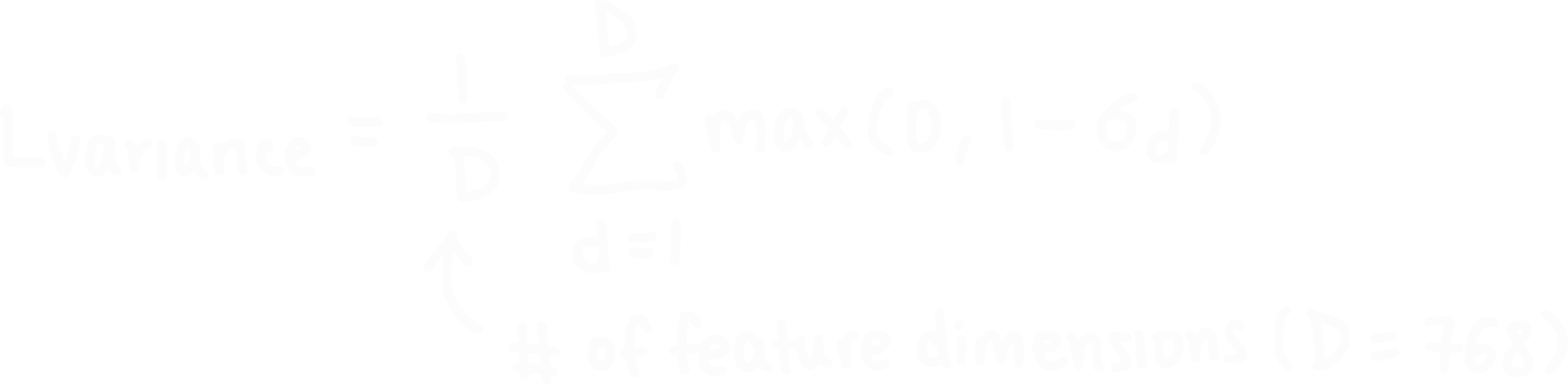
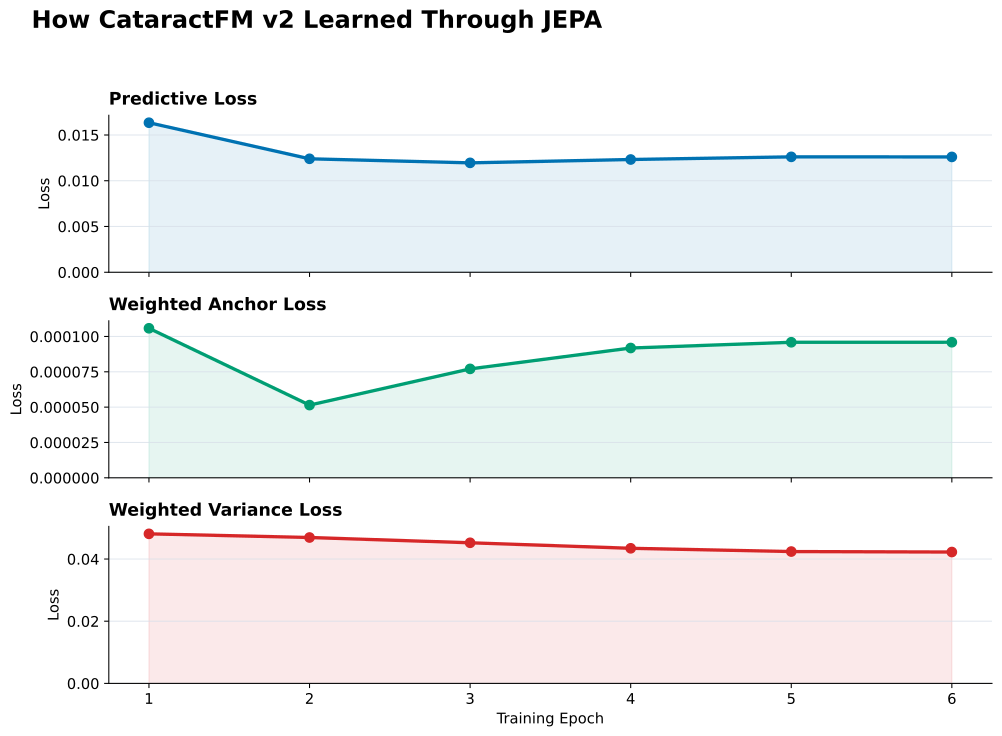
It makes sure that the model is still producing different feature values for different surgical clips. It does this by calculating the standard deviation of each feature dimension across a batch of clips. I gave this loss term a small weight of only 0.05, but that’s all it needs to do its job. The graphs below show how each of the three loss components changed throughout CataractFM v2’s JEPA training.
JEPA Fine Tuning
For JEPA fine-tuning, I only allowed the model’s upper four transformer blocks (8, 9, 10, 11) and the final normalization layer to update, while the rest of the encoder stayed frozen. I used a small encoder learning rate of 5 × 10^-6 so the pretrained features would change slowly, while the new predictor network used a larger learning rate of 1 × 10^-4 because it was starting from scratch. I trained using AdamW as the optimizer with an effective batch size of 32, and ran JEPA training for 6 epochs.
LoRA Surgical Phase Adaptation
Once CataractFM v2 finished JEPA training, I had a stronger foundation encoder that understood both cataract-specific features and more of the temporal relationships between surgical clips. The next step was to adapt this encoder to an actual supervised task such as predicting which surgical phase a clip belongs to. I didn’t want to fine tune all 94 million parameters, since that would take a really long time and potentially cause the model to overfit since I only had 56 labelled surgeries, so I decided to use LoRA. Low-Rank Adaptation (LoRA) is a method that would allow me to keep almost the entire model frozen and only make small adjustments to a few parts and still allow it to specialize.
Here’s how it works: A transformer has a large matrix W of learned weights. If I want to fine-tune the model to become good at, for example, predicting surgical phases, then I would normally directly modify the entire matrix with new weights. What LoRA does instead is it creates two much smaller matrices called A and B:
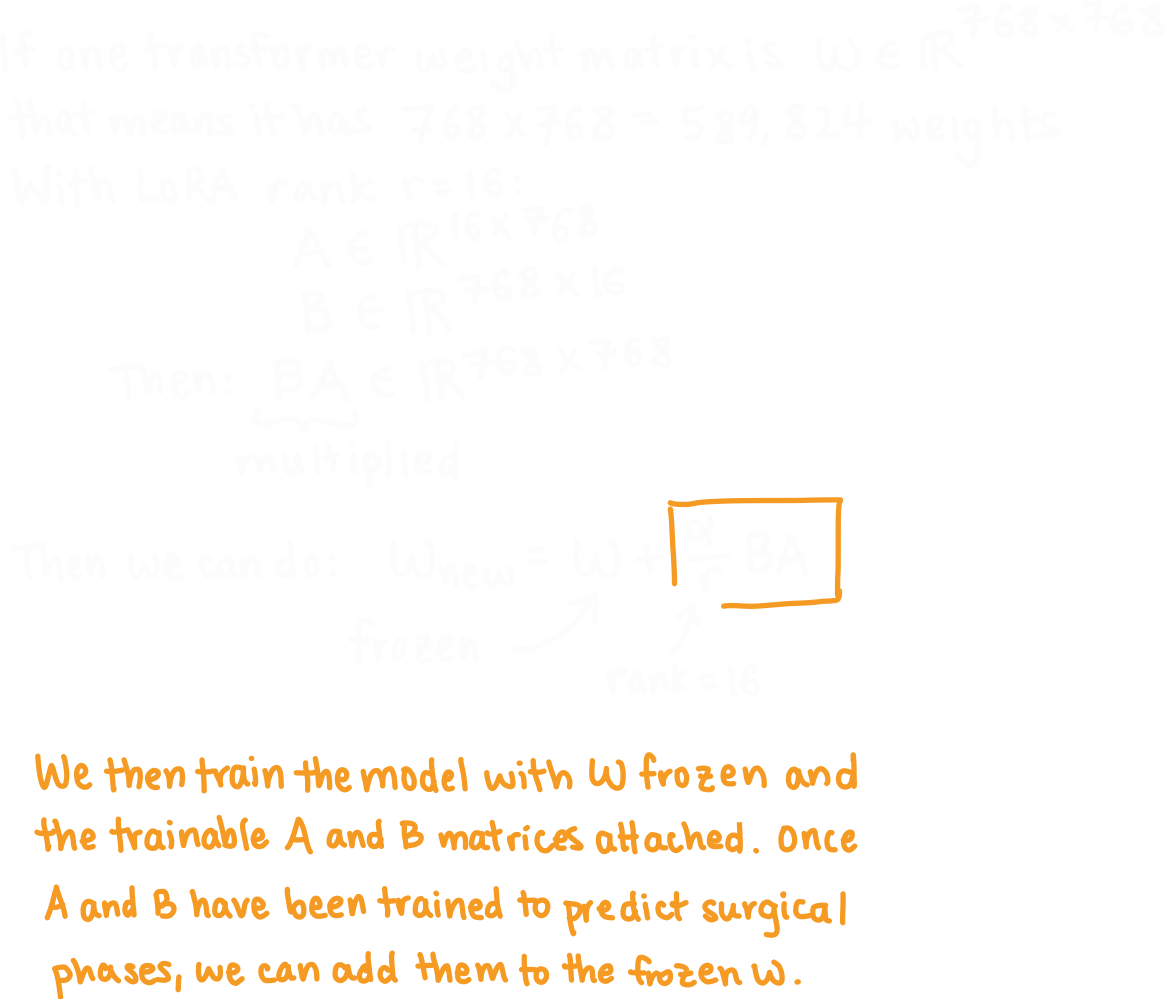
Note that alpha here is not the same alpha as before. In LoRA it basically represents how much influence this LoRA adjustment term has on the original model, which in my case I set to 32 so when it was divided by 16 it would give it a scaling factor of 2.
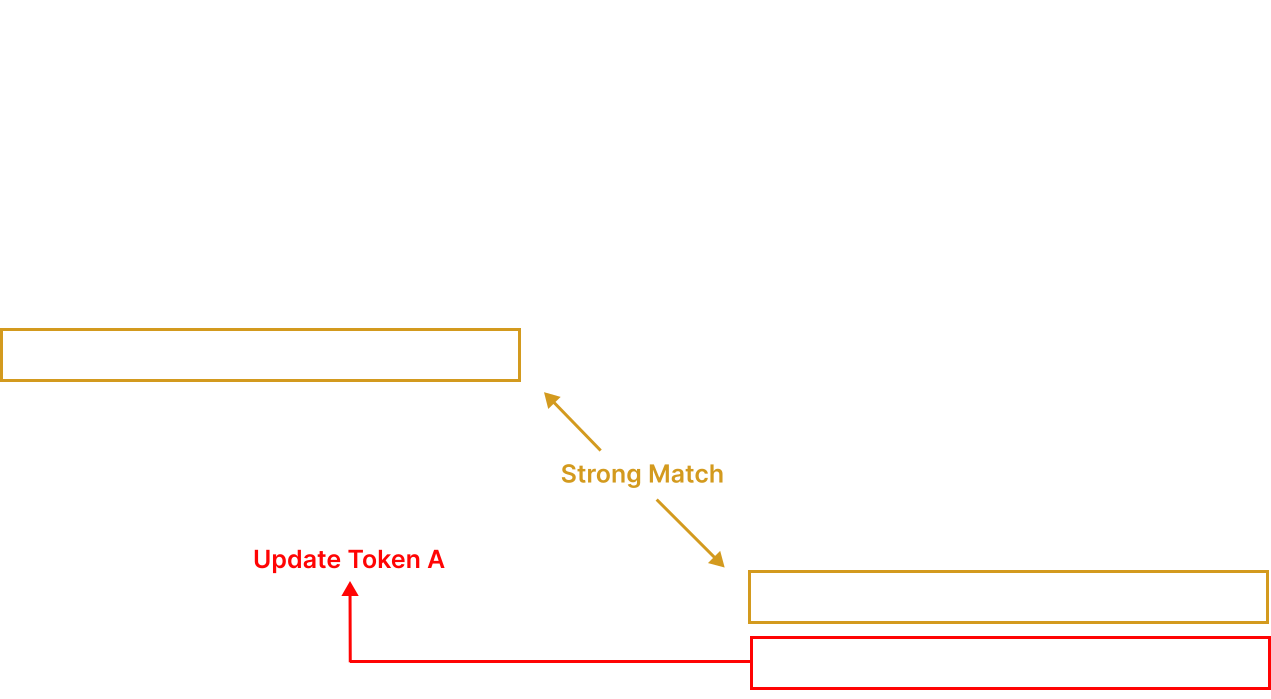
Ok before I explain what LoRA does next let me backtrack and explain what the query, key and value matrices are in transformers because this took me a really long time to understand for some reason so I hope I can explain it clearly here for you. So we talked about tokens. A transformer has a ton of tokens, and each one represents some small part of the video. The problem here is that the model needs to figure out which tokens are related to each other to better understand the video. That is what attention is for. Let’s say one token represents a part of a surgical instrument. For the model to actually understand what is happening, that token might need information about what the rest of the instrument is doing, what tissue it’s touching, other tools in the scene, etc. The transformer needs a way to sift though all the other tokens and quickly figure out which ones matter to this specific instrument token the most. Now THAT’s where the query, key, and value matrices come in. These matrices can be applied to the tokens. So now each token has a query, which is information on what it’s looking for. In the surgical instrument token example, its query might be: “I would like to look for information about other surgical instruments near the lens” (ok obviously it's not actually saying that this is an example). Every token also has a key, which can be compared with queries to see if they match. For example, another token might have a key that says: “I have information about an instrument near the lens”, which would make it a match and thus the model will pay attention to it. Then the model uses the values from the token with the relevant key and uses it to update the original token. So the difference between a key and a value is that a key is like a sign that says what the token has to offer and the value is the actual offering itself. The point of this entire explanation is for me to say that I applied LoRA to the query, key, and value matrices in the final four transformer blocks (8, 9, 10, 11) of the model. This allowed the model to slightly adjust what each token is looking for and what other tokens considers important, so that it is more relevant for surgical phase prediction.
After this, I still needed a way for the model to actually output one of the 13 surgical phases since the model normally just outputs a 768-number feature representation of the clip. I did this by adding a small classification head (it's called head because it's attached to the end of the larger model) to the encoder which takes those 768 features and converts them into 13 scores, one for each phase. The phase with the highest score becomes the model’s final prediction. I then trained this whole setup using the 56 labelled surgeries. For each clip, the model made a phase prediction then compared it with the correct label, and then used that loss to update the LoRA A and B matrices and the classification head. The original CataractFM v2 weights stayed frozen. In total, it only needed to train 320,369 parameters which is 0.37% of the full model (remember that this model has 94 million parameters in total). This means my CataractFM v2 model was able to specialize for surgical phase recognition while keeping over 99% of it unchanged.
Validation
To validate my final model, I divided 56 labelled surgery videos into five case-level folds, where one fold was used for testing, one for validation, and the other three for training, then I rotated this setup so every surgery was used as a test case once. I split the data by surgery instead of by individual clips because clips from the same operation can look very similar, so this makes sure the model is always being tested on surgeries it has never seen before during training.
Results
The final CataractFM v2 model performed much better than v1, with an improvement of about 8.7% in macro F1 and 9.8% in balanced accuracy. I was really happy with the results.
| Model | Macro F1 | Balanced Accuracy |
|---|---|---|
| CataractFM v1 | 0.7098 | 0.7226 |
| CataractFM v2 | 0.7716 | 0.7934 |
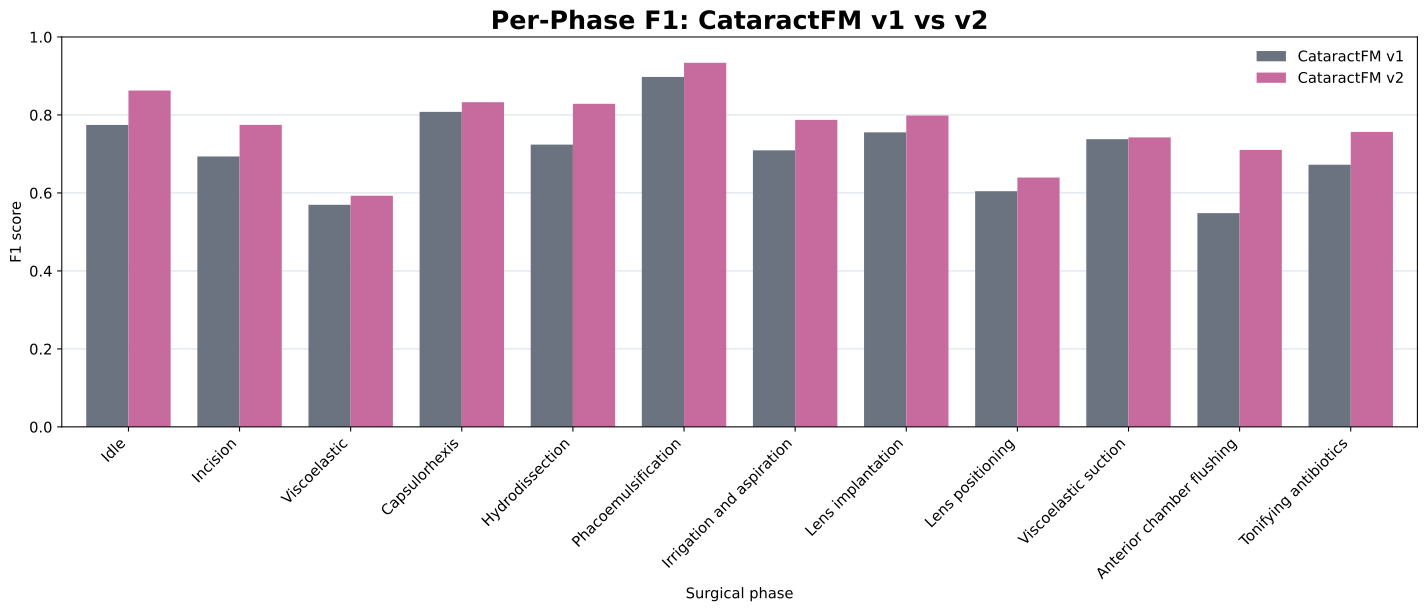
In the graph below, we see that CataractFM v2 improved F1 across almost every surgical phase, with pretty noticeable gains for idle, incision, hydrodissection, irrigation/aspiration, and anterior chamber flushing. Note that the capsule polishing phase is not shown because the evaluation set did not have any labelled examples for this phase so its F1 score could not be calculated.
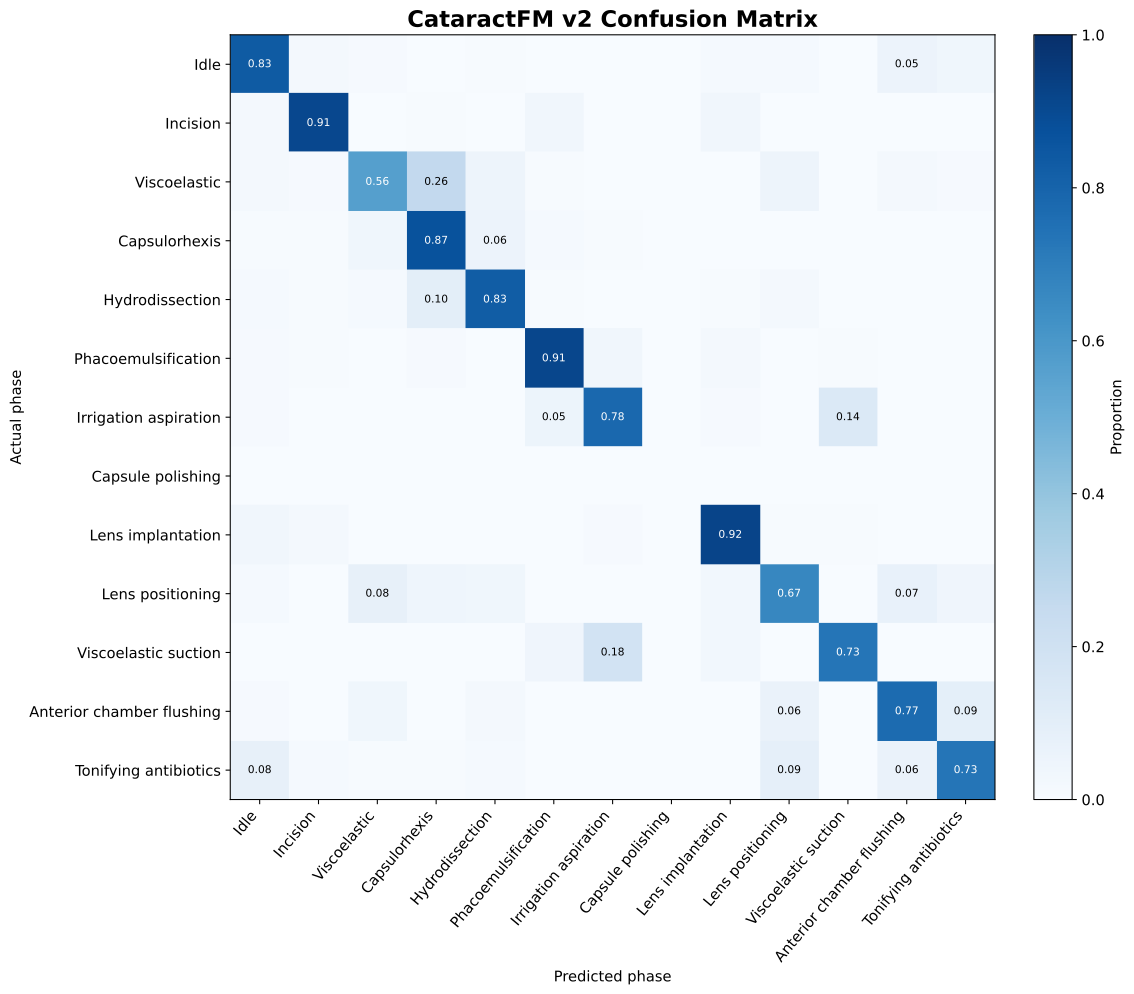
The confusion matrix below shows which phases CataractFM v2 predicted correctly and which ones it confused with something else. Most predictions were along the diagonal, which is good.
In this final graph below, we can see that CataractFM v2 outperformed v1 for all three metrics.
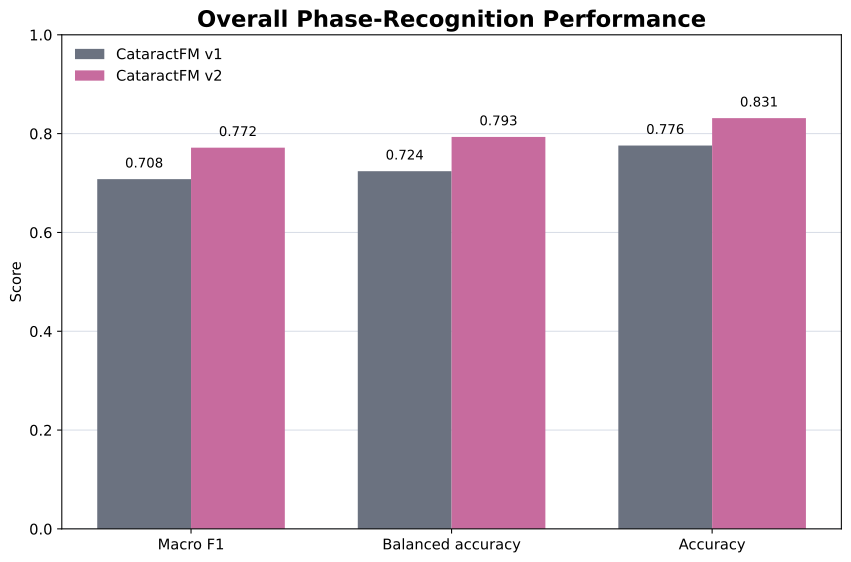
Side Note: Balanced accuracy looks at the model’s performance across all phases equally, while accuracy does not.
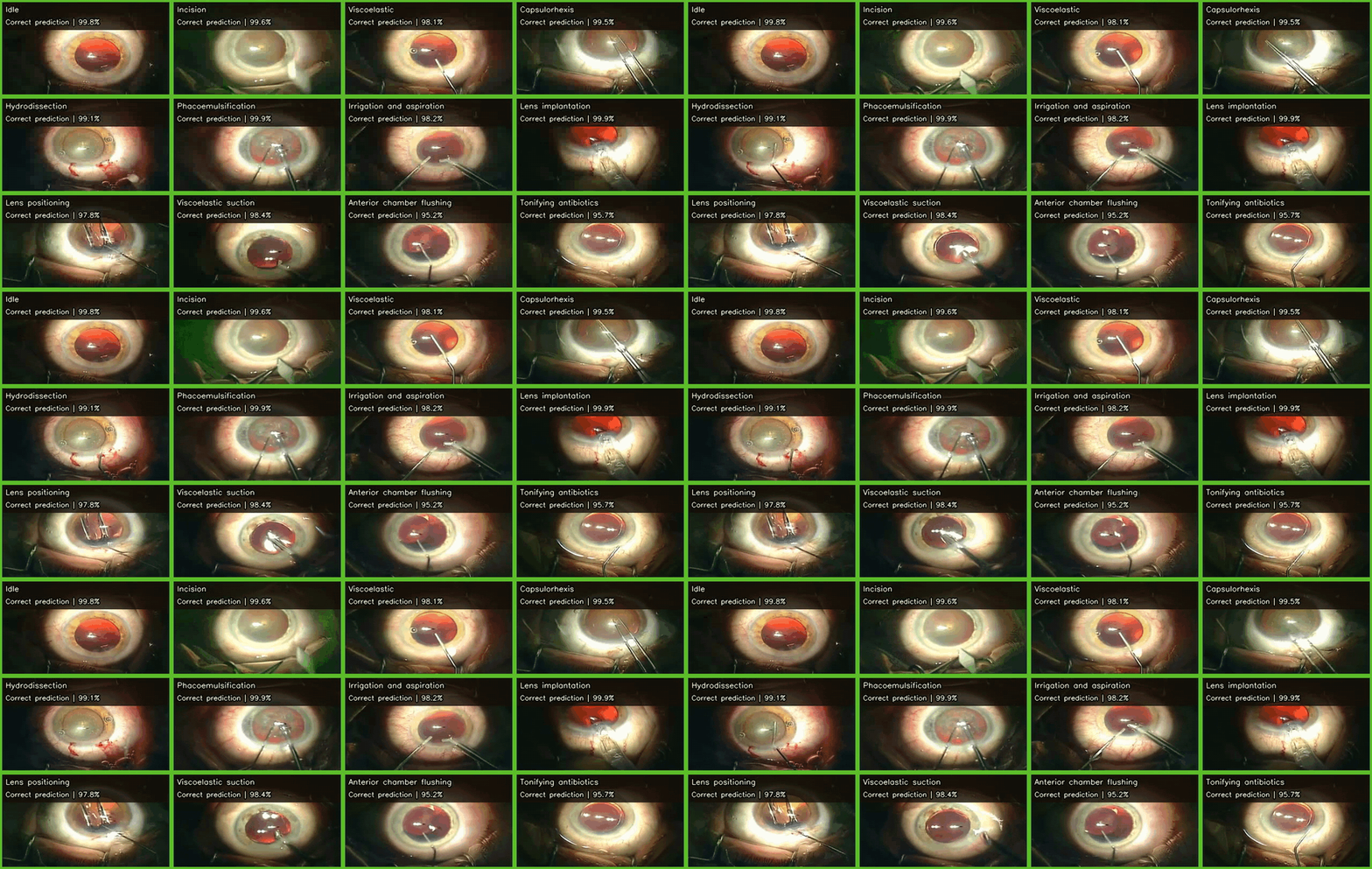
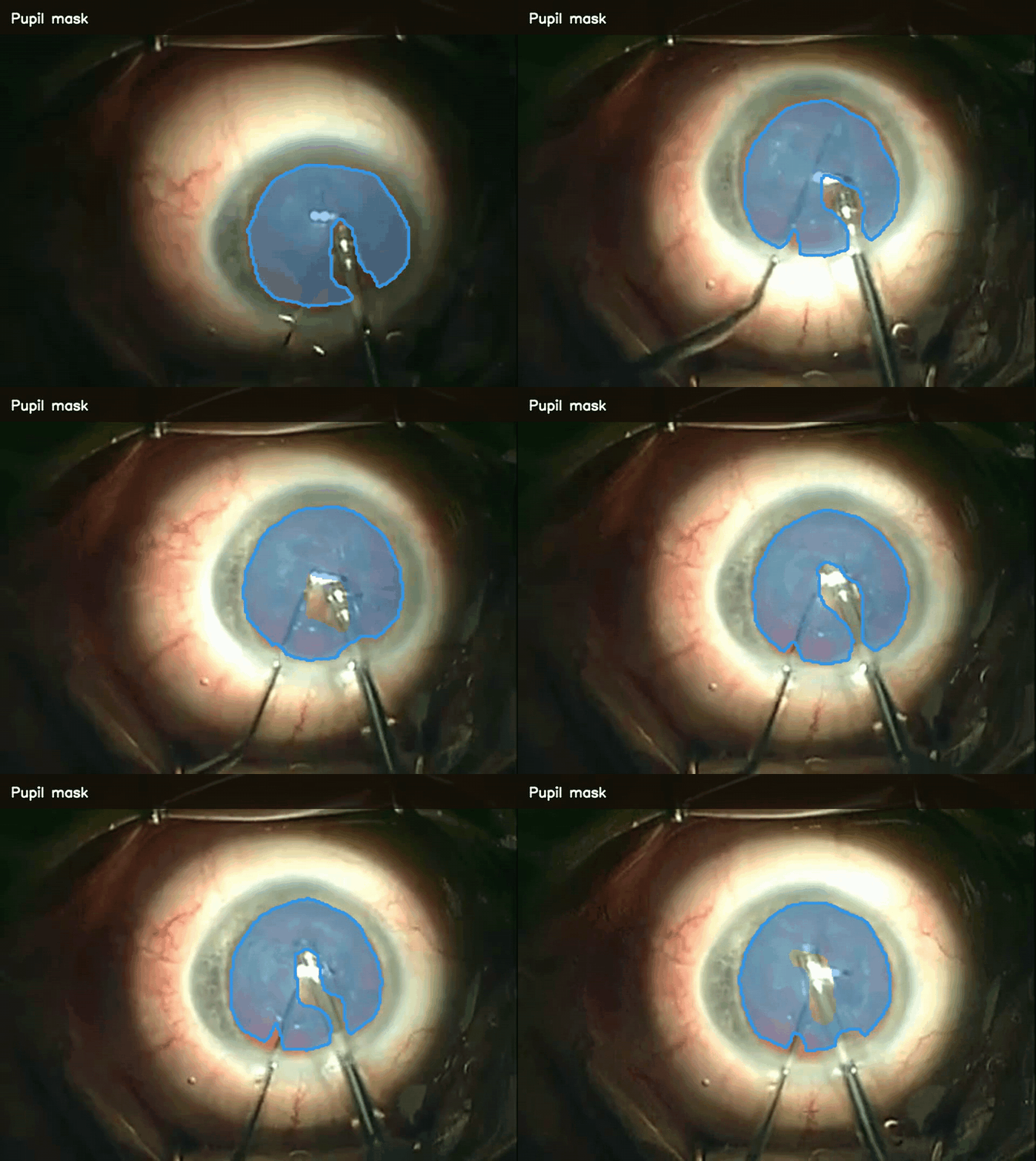
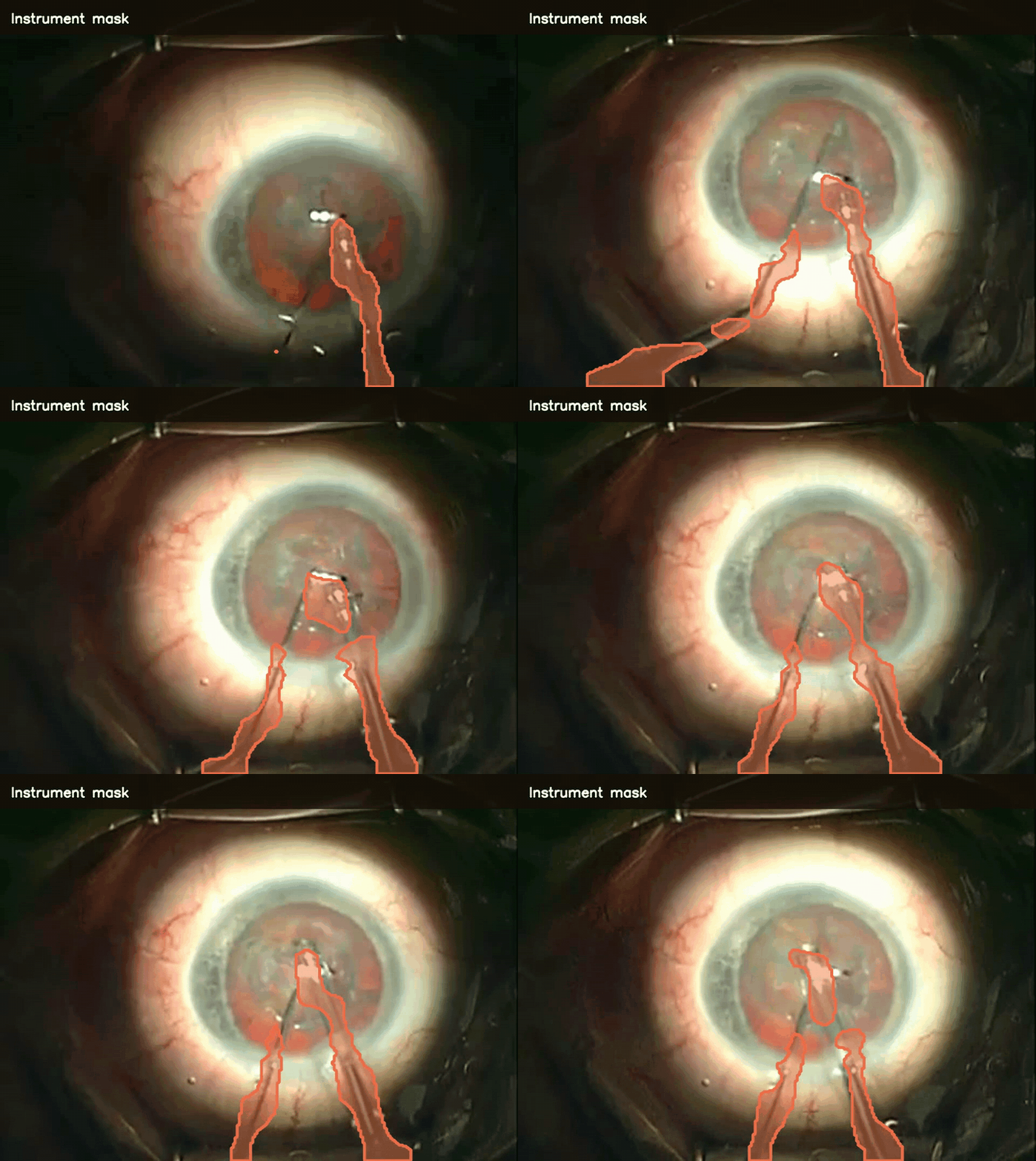
The GIFs below show a few examples of what the trained CataractFM model can do. The first shows surgical phase predictions across 12 different phases, while the other two show segmentation of the pupil and surgical instruments throughout a procedure.